 Kutter
The footage you shot One long take
- Usable
- Filler words
- Silence
- Fluffed, then retaken
- “Um, uh, like” all the way through
- Pauses while thinking, lines said several times
- No subtitles, B-roll, music or cover yet
Just talk to the camera and Kutter does the cutting: filler words out, Thai subtitles, B-roll and music in. You get a ready-to-post short clip, made on your own computer.
 Let me cut that for you!
มือถือเครื่องเดิม ก็พอ
หันหน้าเข้าหา แสง
เสียงชัด สำคัญกว่า
Slipped up? Just say it again and keep going. Kutter listens to every word and keeps only the best parts.
Illustration of how it works · final length depends on your footage and the tightness you pick
AI does the slow part first; you look it over and say yes, or change anything. Already have footage? Skip the script.
Give a topic and AI drafts the script in sections, or paste one you already have.
Drop in what you shot and every word is transcribed, with free on-device Whisper or ElevenLabs.
AI reads everything you said and offers a few takes on it: scripted, tight or storytelling.
AI picks your best takes and cuts the fillers. Preview scene by scene and revise in plain words.
Cover, hook, intro / outro, music and sound effects, pre-filled from your channel style.
Get an MP4 with Thai subtitles and a post caption, or send it on to your favourite editor.
The parts you'd scrub through second by second, Kutter does for you, so you can save your energy for the fun part: the story.
Every word is transcribed with timing, only the unused parts are cut, and subtitles come from what you actually said, in sync on every line.
Matte lifts the speaker off the background on your own computer and places them over B-roll that AI finds to match the words, so the clip never sits still.
Got only mood shots, products or a shop front? AI writes a script in your channel's tone, matches each line to a clip and voices it line by line.
A cover from the sharpest frame, an opening title, intro / outro, your music or free tracks, plus whoosh and pop sounds.
Say “music's too loud”. AI shows what it will change first and keeps the old version, so you can always go back.
MP4 in every size with SRT subtitles, or send to CapCut, Premiere, DaVinci or Final Cut, with a caption AI writes for you.
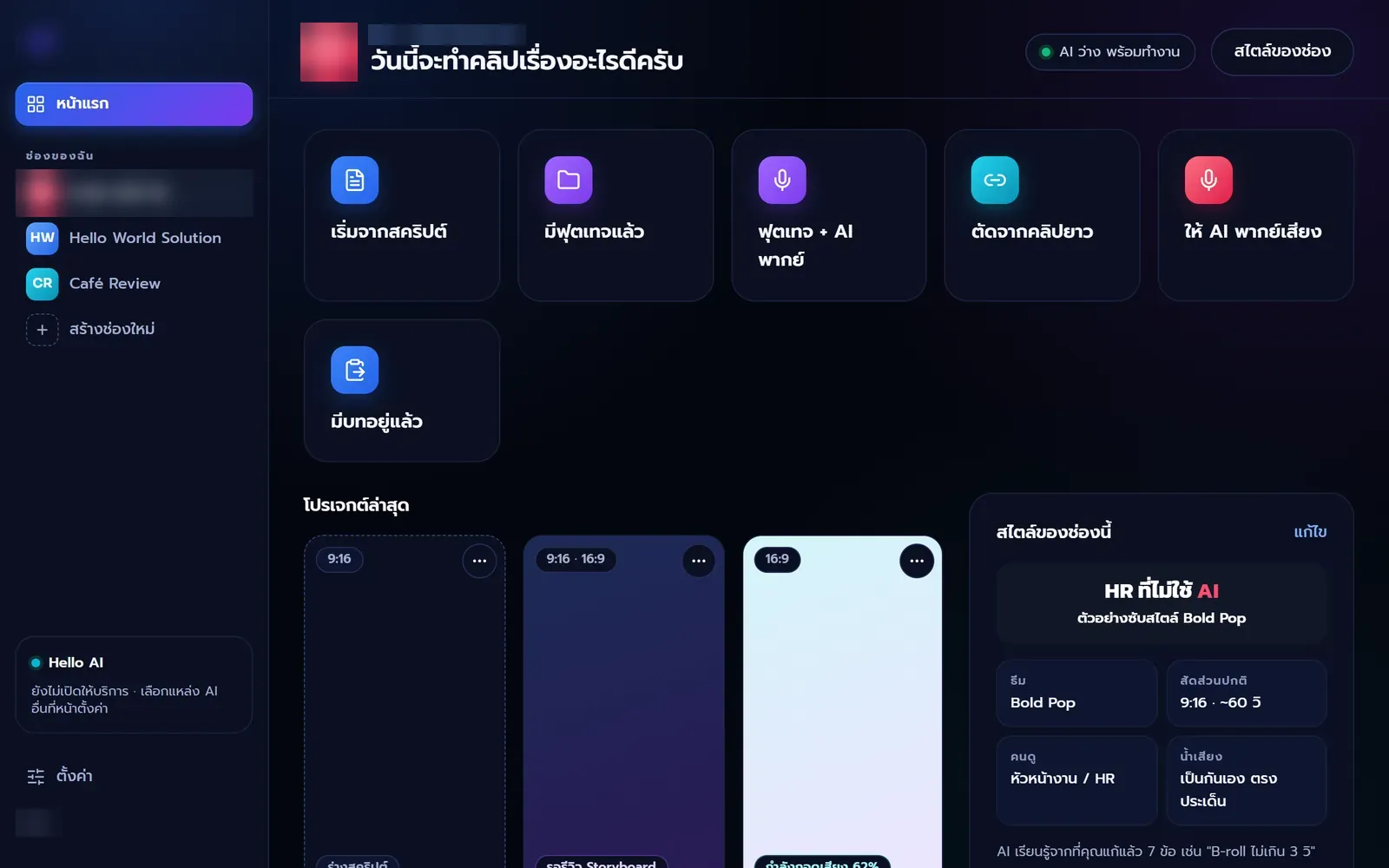
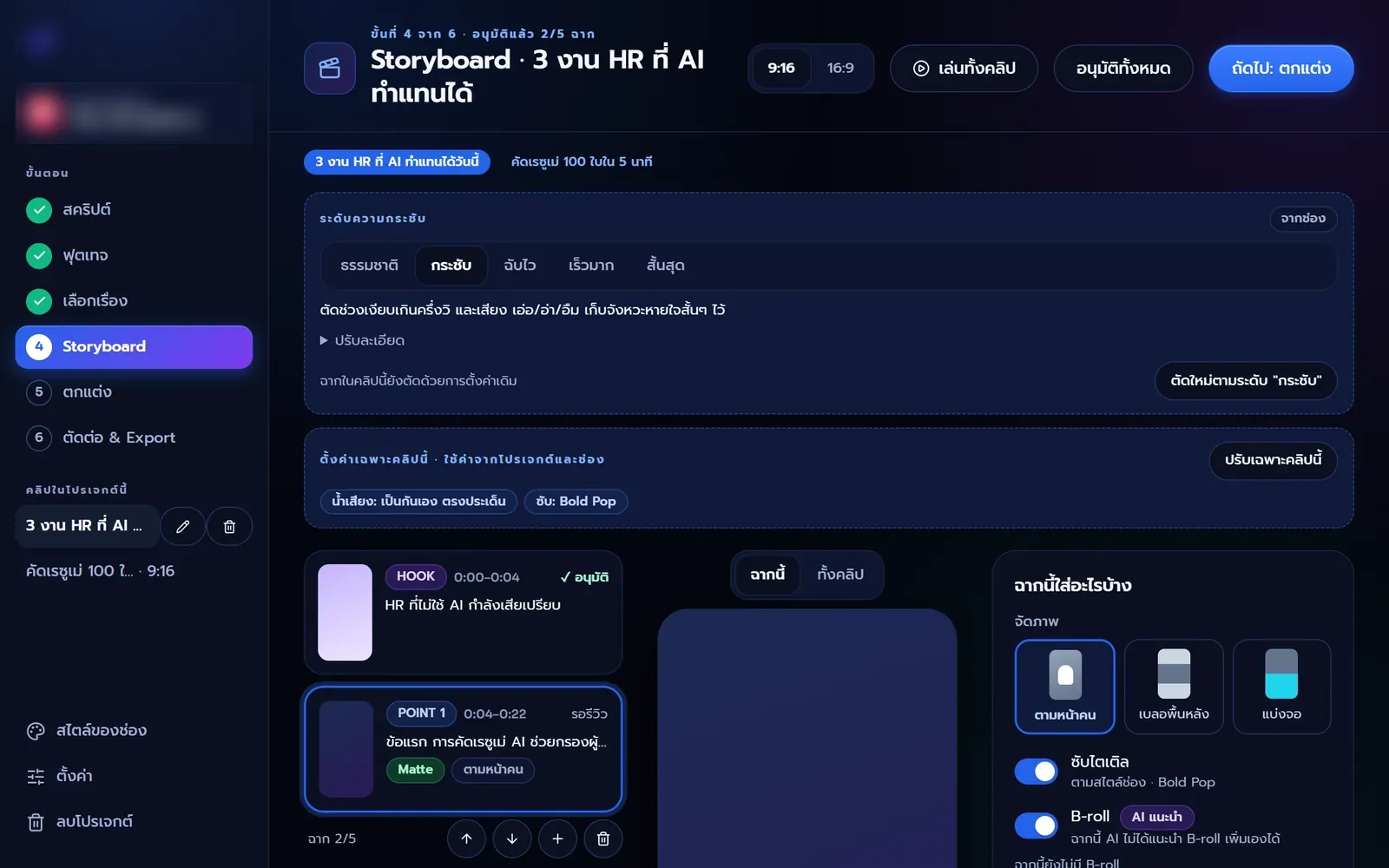
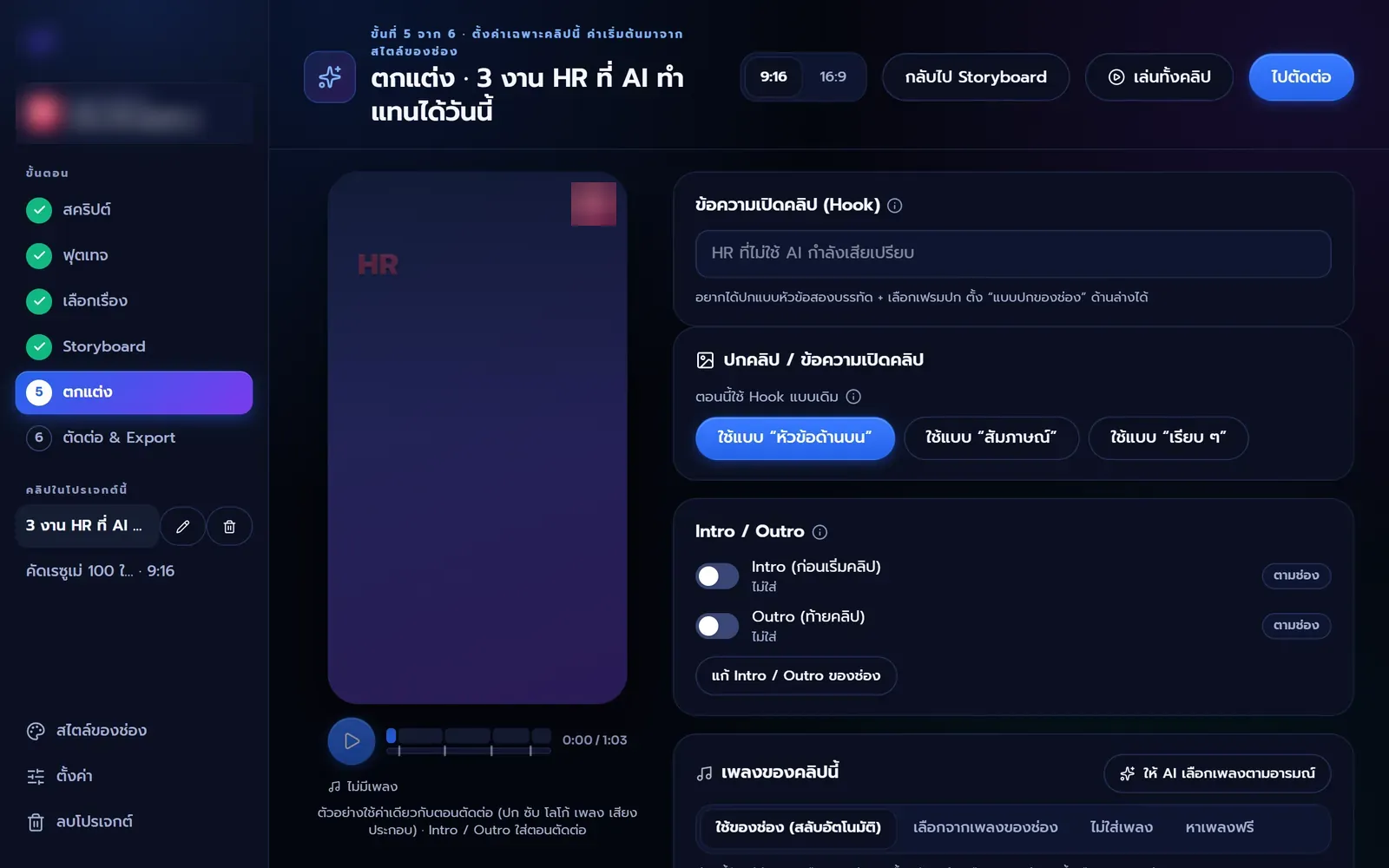
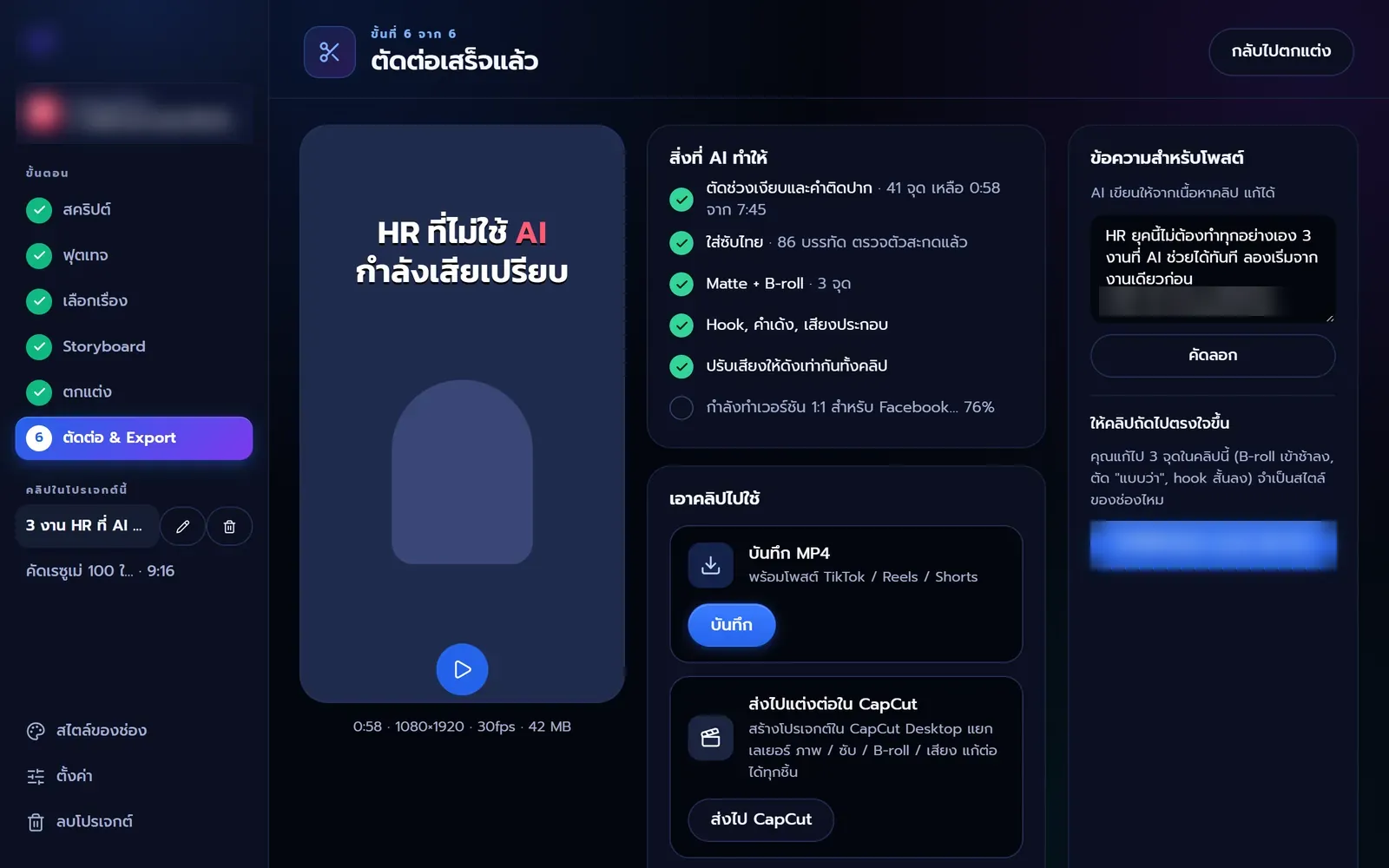
From a test build of the app (dark theme, Thai interface), sample names blurred
Run as many channels as you like. Each remembers its own look and voice, and you switch in one click.
Upload your logo, fonts and brandbook. The app picks up colours and fonts for subtitles, covers and intro / outro.
Audience, tone of voice, words to avoid and story templates. AI reads them before every task.
Tightness, zoom, B-roll, music and your channel's own terms. Set once, used for every new clip.
Kutter isn't tied to one AI company. Use your own key, or the AI plan you already pay for.
No AI provider accounts needed. Sign in with Google and go, with the same account as Hello Translator.
Meanwhile, the other two work right away
Use a Claude, OpenAI or Gemini key and pay the provider directly for what you use. Keys stay in your computer's keychain and never come to us.
Already on Claude Pro/Max or ChatGPT Plus/Pro? Kutter can use it through the app signed in on your computer (experimental).
Your footage and project files stay on your computer and rendering happens there too. The app sends only what an AI task needs, to the provider you chose. Transcribe with Whisper and your audio never leaves the machine · Privacy Policy
Anyone who posts short clips often, without wanting to lose whole days to editing.
Film in one go and get clips with subtitles and covers for every platform.
Start with From a script or I have footage
Make product clips yourself every week; not a talker? Let AI do the voice.
Start with Footage + AI voice
Run several channels, each clip on its own CI and tone.
Set up Channel style once
Turn lives and long classes into a series of short clips.
Start with From a long video
Write a script or let AI write it, and get a voiced clip with visuals and subtitles.
Start with AI voice-over
Let Kutter do the rough cut, then finish in Premiere, DaVinci or Final Cut.
Use Keep editing in Export
Not at all. Kutter walks you through step by step. Each step has a button to let AI go first, then you review; if you don't like something, say so in plain words. If you already edit, send the result on to the app you know.
Kutter is free during launch. With your own API key, you pay the AI provider directly for what you use. With Claude Code or Codex, it uses your plan's quota. On-device Whisper transcription costs nothing. If pricing changes we will announce it in advance, and we won't charge retroactively for the free period.
Your video and project files stay on your computer; the app doesn't upload them to us. What goes out is only what an AI task needs, to the provider you chose, e.g. the transcript text to the AI that plans the story · More in the Privacy Policy
Change it at any step: edit the script or have AI rewrite it, pick another story, change the tightness, revise storyboard scenes, or after rendering just type what you want changed. Earlier versions are kept so you can go back.
Windows 10/11 (64-bit) or a Mac with Apple Silicon (M1 or later). A graphics card speeds up on-device transcription and background removal but isn't required. See the system requirements.
Yes. Send a layered CapCut project (with editable subtitles), XML for Premiere Pro and DaVinci Resolve, or FCPXML for Final Cut Pro, with SRT subtitles.
Kutter is built first for great Thai subtitles, and can dub a finished clip into 10 other languages as a separate clip with subtitles in that language. Your Thai clip stays as it is.
Hello World Solution's AI service, sharing one account with Hello Translator. Sign in with Google and go, no AI provider accounts needed. It isn't open yet; meanwhile use your own API key or Claude Code / Codex on your computer.
Download free, install, drop in your footage, and let Kutter help with the rest.
Windows 10/11 (64-bit) · Mac with Apple Silicon · System requirements